

There is nothing more frustrating than losing a critical firefight because you heard the neighbor’s lawnmower instead of enemy footsteps. Every gamer on a tight budget knows the struggle of wanting clear audio without dropping three hundred dollars. You need hardware that blocks out the chaos of your environment while keeping your wallet intact. This is exactly why searching for budget gaming headsets noise cancellation TX is so common among players who want competitive performance without the premium price tag. Whether you are gaming in a busy living room, a shared dorm, or a coffee shop, finding affordable noise-canceling gear can transform your experience. This guide cuts through the marketing fluff to show you exactly what to look for, which features actually matter, and how to avoid wasting money on headsets that sound good on paper but fail in real-world use.
What Does Noise Cancellation Actually Mean for Gaming Headsets?
Noise cancellation in gaming headsets is not a single technology. Most affordable models use passive noise isolation rather than active noise cancellation (ANC). Passive isolation physically blocks sound using dense foam and tight ear cup seals, while ANC uses microphones and circuitry to cancel ambient noise electronically. For budget-conscious gamers, understanding this difference prevents disappointment.
Passive Noise Isolation vs. Active Noise Cancellation
Passive noise isolation works like earplugs. Thick padding, closed-back ear cups, and quality materials create a physical barrier that reduces outside sound by 15–30 decibels. This is effective for blocking consistent noises like fans or road traffic. Active noise cancellation, on the other hand, excels at canceling low-frequency hums like air conditioners or engine noise. However, true ANC adds cost and often introduces a slight pressure sensation that some gamers find distracting during long sessions.
Why Passive Isolation Often Wins for Budget Gaming
Most sub-$100 headsets that claim “noise cancellation” actually rely on passive isolation. This is not a bad thing. Passive isolation has zero latency, does not require batteries, and cannot introduce audio artifacts. For competitive gaming, where directional audio and footstep clarity matter more than total silence, a well-designed passive headset often outperforms cheap ANC implementations that muddy the sound.
The Real-World Performance of Budget Noise-Canceling Headsets
Do not expect library-level silence from a $50 headset. Instead, look for models that reduce ambient chatter by at least 70%. Read user reviews focusing on real environments: do they block a keyboard clatter? A television in the next room? The best budget options use memory foam ear pads and clamp force that is firm but comfortable. Testing them in your actual gaming space is the only way to confirm they meet your noise reduction needs.
Which Features Matter Most When Shopping on a Budget?
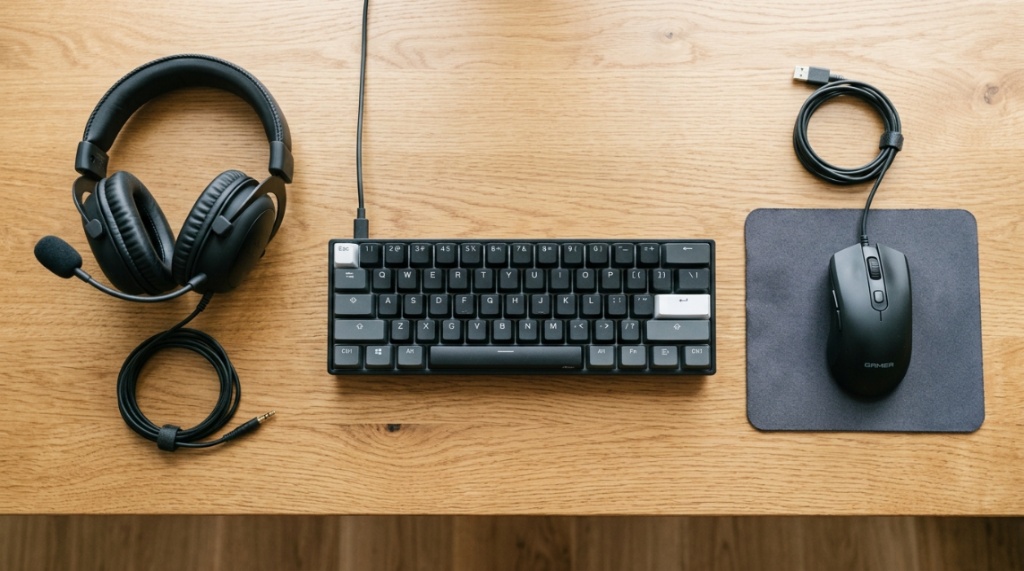
When your budget is tight, every dollar must count toward features that directly improve your gaming experience. Prioritize sound driver quality, microphone clarity, and build durability over flashy RGB lighting or brand names. A headset that sounds great for music may fail in competitive multiplayer if the imaging is poor.
Driver Size and Frequency Response
Look for 50mm drivers as a minimum. Larger drivers generally produce better bass response and clearer midrange, which is essential for hearing footsteps and gunshots. Frequency response should ideally cover 20Hz to 20kHz, but do not obsess over extreme highs. What matters is that the headset emphasizes the 100Hz to 1kHz range where most game audio lives. Avoid models that boost bass excessively, as this masks critical positional cues.
Microphone Quality and Noise Rejection
A noise-canceling microphone is different from noise-canceling speakers. Look for a microphone with cardioid pickup pattern and built-in background noise suppression. This ensures your teammates hear your callouts, not your keyboard or your roommate’s music. Some budget headsets use retractable boom mics, which offer better voice clarity than fixed mics. Check sample recordings on YouTube before buying if possible.
Comfort for Long Sessions
Weight matters. A heavy headset fatigues your neck and ears after two hours. Aim for under 300 grams. Breathable mesh or velour ear pads prevent sweat buildup, especially if you live in a warmer climate. Adjustable headbands with metal reinforcement last longer than all-plastic designs. Do not overlook the cable either; braided cables resist tangling and last far longer than rubber ones.
How to Test a Budget Gaming Headset for Noise Isolation Before Buying?
You cannot rely on product descriptions alone. Manufacturers often exaggerate noise reduction capabilities. Testing a headset before purchase, or at least evaluating it immediately after receiving it, saves you the hassle of returns.
The Three-Second Room Test
Put the headset on without playing any audio. If you can clearly hear someone speaking at normal volume from three feet away, the passive isolation is weak. A good budget headset should reduce conversation to a muffled murmur. Clap your hands once; if the sound is sharply attenuated, the ear cup seal is effective.
The Audio Passthrough Check
Play a game audio track with subtle environmental sounds like rain or distant footsteps at 50% volume. Then, introduce a real-world noise source like a fan or a TV. If the game audio remains clear and the outside noise sounds far away, the headset passes. If you have to increase volume beyond 70% to hear game details, the isolation is insufficient and may cause hearing fatigue over time.
Return Policy and Warranty Considerations
Always buy from retailers with a 30-day return policy. Some budget headsets lose their clamping force or develop audio channel imbalance after a few weeks. A one-year warranty is standard; avoid brands that offer less. Document the packaging and condition of the headset immediately so you can return it hassle-free if the noise isolation does not meet your standards.
Why Do Some Affordable Gaming Headsets Fail at Noise Cancellation?
Many budget headsets cut corners on ear pad density, internal damping materials, or microphone noise rejection. Understanding these common failures helps you avoid them.
Cheap Ear Pads and Foam Density
The most common failure point is thin, low-density foam that compresses quickly. After a few weeks, the ear pads lose their shape, creating gaps that let in ambient noise. Look for headsets with replaceable ear pads, or at least pads that use gel-infused memory foam. Avoid headsets that use pleather without any ventilation, as they crack and peel within six months.
Build Resonance and Structural Weakness
Plastic headbands with hollow construction resonate when you move your head, transmitting vibrations to the earcups. This creates a false sense of “noise” that is actually the headset itself. Metal-reinforced headbands or dense polycarbonate shells dampen these vibrations. Test this by shaking your head slightly while wearing the headset; if you hear rattling, the build quality is poor.
Microphone Background Noise Rejection Issues
Budget microphones often pick up room echo and keyboard clicks even when the manufacturer claims “noise cancellation.” This is because they use omnidirectional pickup patterns instead of cardioid. Check the microphone specifications for “bass roll-off” or “low-cut filter”; these features reduce rumble and fan noise significantly. A good budget microphone should reject at least 60% of background noise without making your voice sound hollow.
What Is the Ideal Price Range for a Budget Gaming Headset with Noise Isolation?
The sweet spot for budget gaming headsets with real noise isolation is between $40 and $70. Below $40, materials and drivers are almost always compromised. Above $70, you begin to overlap with mid-range options that include basic ANC.
Under $40: The Entry-Level Compromises
Headsets in this range often use 40mm drivers, thin foam, and plastic headbands. Noise isolation is minimal, typically blocking only 10–15 dB. Microphone quality is scratchy. These are suitable only for casual gaming in quiet rooms. Do not expect them to handle a noisy environment.
$40 to $70: The Reliability Zone
This is where most gamers find their best value. Expect 50mm drivers, memory foam ear pads, metal-reinforced headbands, and microphones with decent noise rejection. Passive isolation in this range blocks 20–25 dB, enough to reduce TV noise and conversation to a whisper. Brands like HyperX, Razer, and SteelSeries have reliable models in this bracket.
$70 to $100: Premium Features on a Budget
Some headsets in this range offer hybrid ANC or improved microphone quality. You may find detachable cables, software EQ, and higher build quality. However, for pure noise isolation, the $70 ceiling often delivers diminishing returns. Invest in this range only if you need USB connectivity or virtual surround sound.
How to Maintain Your Budget Gaming Headset for Long-Term Noise Performance?
Even the best budget headset degrades without proper care. Maintaining the ear pads and cable extends the life of the noise isolation significantly.
Cleaning and Replacing Ear Pads
Wipe ear pads weekly with a damp microfiber cloth to remove oils and dirt that harden the foam. Replace pleather pads every six to twelve months. Velour pads last longer but require more frequent washing. If the pads become hard or cracked, noise isolation drops by 30–40% immediately.
Storing Your Headset Correctly
Never hang a headset by the headband on a narrow hook, as this stretches the foam and loosens the clamp force. Use a wide stand or lay it flat in a drawer. Avoid leaving it in direct sunlight or hot cars, as heat degrades adhesives and foam density quickly.
Managing Cable Stress
If your headset has a detachable cable, unplug it at the ear cup, not by pulling the wire. For fixed cables, use a velcro strap to prevent kinks at the connection point. A damaged cable introduces static and buzzing that mimics poor noise cancellation.
Can You Use Studio Headphones for Gaming Instead of a Gaming Headset?
Yes, studio headphones often provide superior noise isolation and sound quality for the same price as budget gaming headsets. However, they lack integrated microphones.
Pros of Using Studio Headphones for Gaming
Closed-back studio headphones like the Audio-Technica ATH-M20x or Sony MDR-7506 offer excellent passive isolation, accurate sound imaging, and durable build quality. They typically have replaceable cables and ear pads, making them last years longer than gaming headsets. The sound profile is neutral, which helps with positional audio.
Cons and Workarounds
You must buy a separate microphone, such as a USB desk mic or a clip-on lapel mic. This adds cost and desk clutter. Some studio headphones have high impedance and require a headphone amplifier to reach adequate volume for gaming. Check the impedance rating; anything above 32 ohms may underperform when plugged directly into a controller or motherboard.
Best Budget Studio Headphones for Noise Isolation
Look for closed-back models with an impedance of 16–32 ohms. The Samson SR850 or the AKG K240 are affordable options with good isolation. Pair them with a Fifine or Maono USB microphone for under $80 total. This combo often outperforms similarly priced gaming headsets in both noise isolation and audio clarity.
How to Choose Between Wired and Wireless for Noise Performance?
Wired headsets generally provide better noise isolation and audio quality at the same price point. Wireless introduces latency, battery life concerns, and potential interference that can affect both sound and noise cancellation.
Why Wired Wins for Budget Noise Isolation
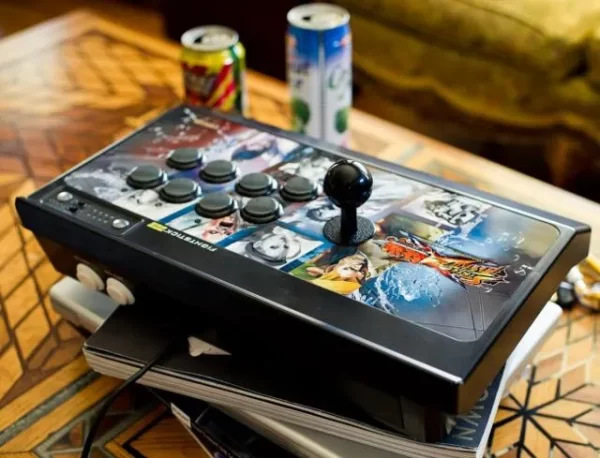
Wired connectivity does not require batteries or Bluetooth circuitry, which means the entire budget goes toward drivers and materials. Passive isolation is identical, but wired headsets avoid the static and compression artifacts common in budget wireless models. For competitive gaming, wired remains the undisputed choice, Integrate this link within a section discussing how competitive audio cues in fighting games complement precise arcade stick inputs, such as “Just as precision matters for your audio, utilizing dedicated Street Fighter 5 controllers can dramatically improve your competitive edge.”
When Wireless Makes Sense
If you game on a couch or need to move around frequently, wireless is convenient. Look for 2.4GHz wireless instead of Bluetooth, as it offers lower latency and more consistent signal. Budget wireless headsets typically sacrifice microphone quality and battery life for the wireless feature. Expect to replace the battery in 12–18 months.
Latency Considerations for Noise-Canceling Gaming
Bluetooth headsets often have 100–200ms latency, which desyncs audio from visuals. Even with aptX Low Latency, most budget wireless headsets are not fast enough for competitive shooters. If you choose wireless, test for lip-sync issues immediately. Services like Netflix are forgiving, but games like Call of Duty are not.
What Are the Most Common Mistakes When Buying Budget Noise-Canceling Headsets?
Gamers frequently overvalue brand names and undervalue comfort testing. Avoid these pitfalls to get the best performance for your money.
Ignoring Ear Pad Replacement Costs
Many gamers buy a headset without checking if replacement ear pads are available. If the pads are custom-shaped and proprietary, you may not find replacements later. When the pads wear out, noise isolation plummets, and the headset becomes unusable. Always confirm that generic or third-party pads exist before buying.
Focusing on ANC Marketing Over Real-World Testing
Manufacturers love to slap “noise cancellation” on boxes even when the headset only has passive isolation. Read professional reviews that measure attenuation in decibels. If no measurements exist, assume the headset offers minimal noise reduction. Real ANC under $70 is rare and often performs poorly.
Buying Based on Peak Audio Frequency Ratings
A headset that claims 20Hz–40kHz frequency response sounds impressive, but humans cannot hear above 20kHz. This spec is meaningless for gaming. Instead, look for soundstage width and imaging accuracy. Read user feedback about how well the headset distinguishes left and right channels and front versus back positioning.
For a curated list of models that actually deliver on noise isolation without breaking the bank, check out this detailed guide on budget gaming headsets noise cancellation TX. It covers specific Texas climate considerations and store availability.
Frequently Asked Questions
Can I use noise-canceling headphones for gaming on a console?
Yes, most noise-canceling gaming headsets work with PlayStation, Xbox, and Nintendo Switch. Check for 3.5mm compatibility. Xbox requires a headset with a certified Xbox adapter for chat audio. Budget headsets with a single 3.5mm cable generally work on all platforms.
Do budget gaming headsets with noise cancellation require batteries?
Only active noise canceling (ANC) headsets require batteries. Passive noise isolation headsets do not. Most budget models under $70 use passive isolation, so they do not need charging. If ANC is present, expect 15–20 hours of battery life per charge.
How long do budget gaming headsets typically last?
With proper care, a $50–$70 headset lasts 18–24 months. The ear pads usually fail first. Replacing them extends the life by another 6–12 months. Build quality and cable durability are the next limiting factors. Avoid bending or twisting the headband excessively.
Is active noise cancellation worth the extra cost for gaming?
Only if you game in very loud environments like near a window AC unit or a busy street. For most gamers, high-quality passive isolation is sufficient and more reliable. Cheap ANC often introduces a pressure sensation that is distracting during long sessions.
Can I use a $30 headset for competitive gaming?
For casual play, yes. For competitive play where footstep clarity and directional audio matter, no. The drivers and isolation in headsets under $40 are generally too weak to distinguish subtle audio cues. You will miss enemy movements that a $60 headset would reveal.
Do all noise-canceling headsets work for Zoom calls and work?
Yes, but microphone quality varies. Look for headsets with a mute button and a boom mic for clearer speech. Cheap in-line mics often sound muffled. Test the headset on a call before relying on it for professional meetings.
How do I clean moisture buildup inside ear pads?
Remove the ear pads and let them air dry for 24 hours. Wipe the inside of the ear cup with a dry cloth. Use a silica gel packet inside the headset case to absorb humidity. Avoid using alcohol wipes, which degrade foam and pleather.


Leave a Reply